NotesGuide
SaaS product demo videos: a practical guide for founders
What a SaaS product demo video is, how long it should run, what goes into one, how it gets made, what it costs and how to keep it accurate.
A SaaS product demo video is a short film, usually 45 to 90 seconds, that shows a buyer what your software does by walking through its real screens. It has a script, animated interface, voiceover and music, and it lives on your homepage, in sales emails and on YouTube. This guide covers what goes into one, how long it should run, how it gets made and what it costs, based on how I make them at the studio.
What is a SaaS product demo video?
A demo video answers one question for someone who has never used your product: what does it do, and could I do my job with it? It does that with your actual interface on screen, not with metaphors or illustrations.
That is the main difference from the two formats it gets confused with:
- An explainer video makes one idea clear: what the product is, who it is for and why it matters. It often works in illustration and analogy, and it can run without showing much of the interface at all.
- A product launch film is a short film for launch day, your homepage and social. It is built to get attention on a specific day, on X, Product Hunt and LinkedIn, and it usually runs 30 to 60 seconds.
- A demo video walks through the product itself. It is less about the announcement and more about the workflow: here is the screen, here is what you do, here is what you get.
Plenty of companies end up with all three. If you only make one, and your product is software people will use every day, make the demo.
How long should a product demo video be?
The studio's demo packages run 60 or 90 seconds, inside a typical range of 45 to 90 seconds.
- 60 seconds is enough for one clear story: the problem, the two or three moments in the product that solve it, and the result. It suits a homepage and a sales call.
- 90 seconds gives room for a fuller walkthrough, with time to show how the pieces connect. It is the better fit when the product has more than one core workflow.
Length follows the story, not the other way round. If the script needs two minutes to make sense, the product story usually needs cutting, not the video stretching. A demo that tries to show every feature turns into a tour, and tours are hard to remember.
For social, a 9:16 vertical cutdown of the same film does a different job: it is made for a phone held upright.
What goes into a demo video
Every demo I make includes the same core parts:
| Part | What it does |
|---|---|
| Script | The story, line by line: the problem, the moments in the product, the outcome |
| Your UI, rebuilt and animated | Your real interface on screen, made to move with the story |
| Voiceover | Carries the story so the screens can stay simple |
| Music | Sets the pace and the tone |
| Sound design | Small sounds on clicks, transitions and results, so the motion feels physical |
The script comes first because everything else follows it. A good demo script picks one viewer, one problem and the shortest path through the product to the result. Then the animation has a clear job: point the eye at the part of the screen that matters right now.
Screen recording or rebuilt UI?
There are two ways to get your product on screen: record it, or rebuild it.
A screen recording is a video of your product at one resolution, captured on one day. It is quick, and for an internal walkthrough it is often enough. In a finished film it has three limits. It goes soft when the camera moves in for a close-up, because zooming enlarges fixed pixels. It is one shape, so a 16:9 recording has to be cropped or re-recorded for a vertical cut. And when your UI, pricing or copy changes, it has to be shot again.
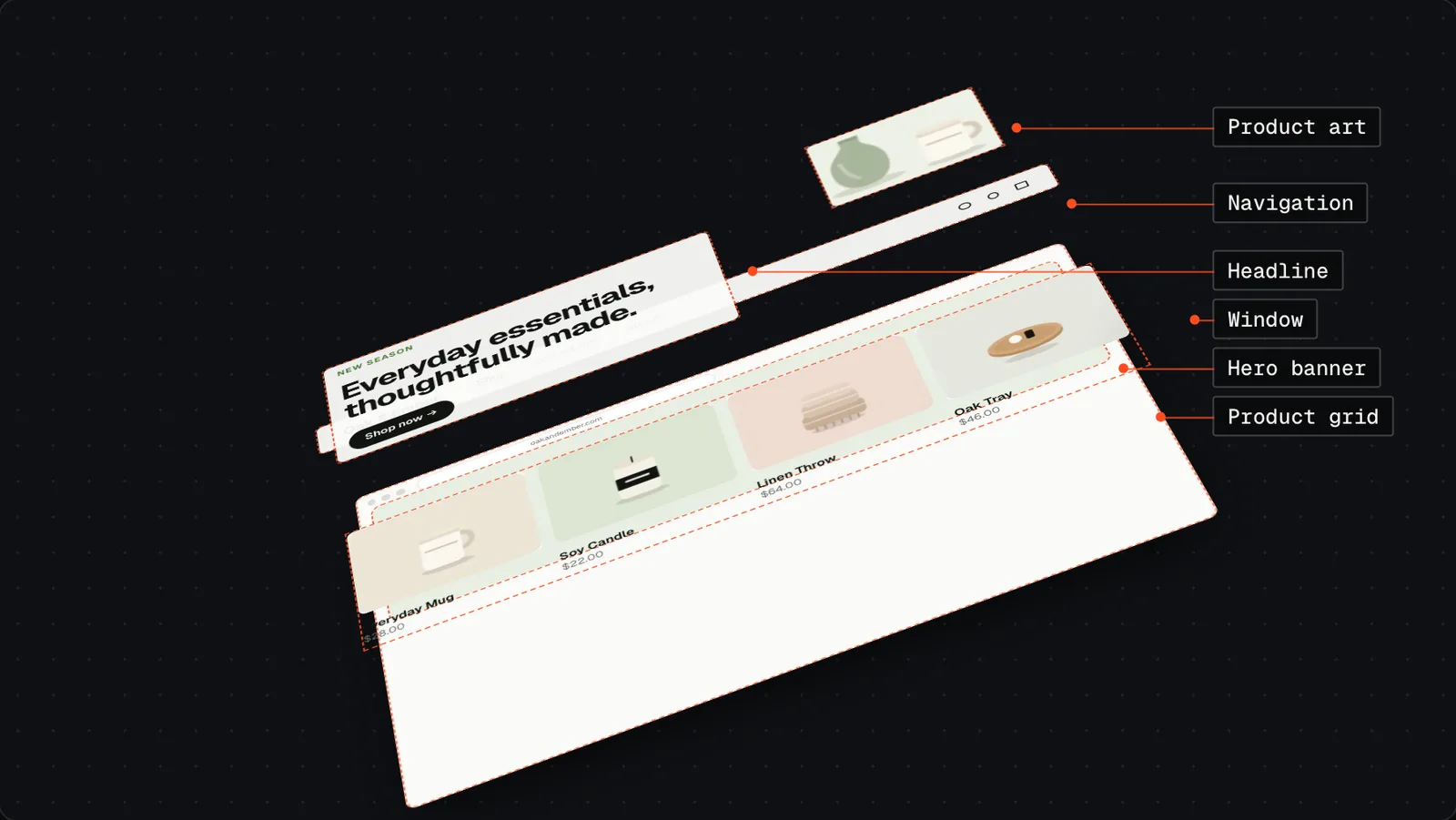
A rebuilt UI is your product's real interface made again as separate, live layers: the navigation, the headline, the cards, the numbers. It looks exactly like your product because it is built from your actual screens, but nothing in it is a flat picture.
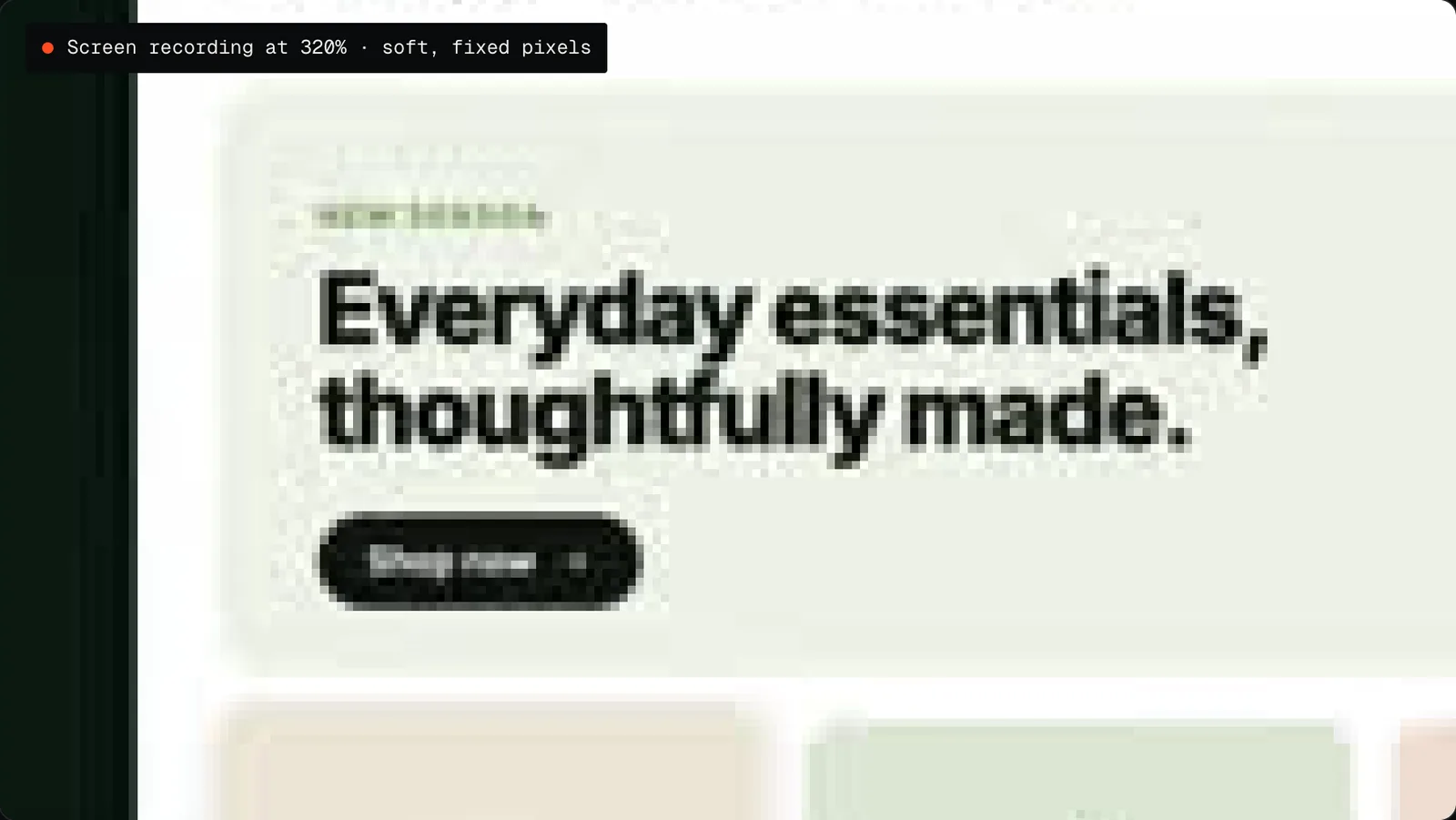
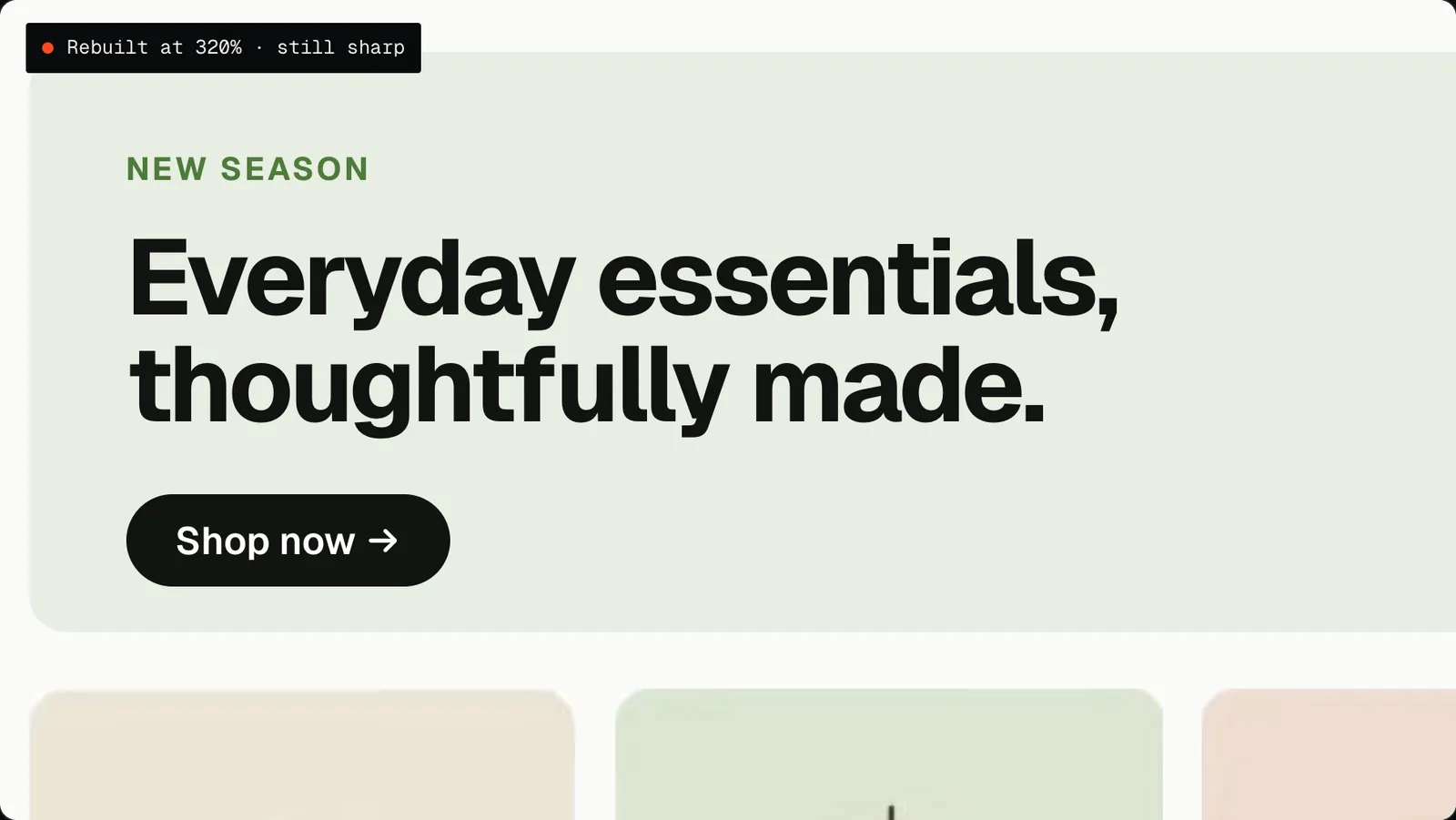
A rebuilt interface is laid out again at every size, so it stays sharp however close the camera gets.
In practice that changes four things:
| In the film | Screen recording | Rebuilt UI |
|---|---|---|
| Close-ups | Soft, blocky | Sharp at any size |
| Formats | One shape per recording | 16:9, 4:5, 9:16 and 1:1 from one master |
| Animation | Cursor and scrolling | Every element can move on its own |
| Product changes | Re-record | Update the text, price or screen and re-render |
That is why every demo I make uses a rebuilt interface. The images above come from "Visitors to customers", a Shopify concept piece: self-initiated, and not affiliated with or endorsed by Shopify.
How a demo video gets made
The process has six stages, and the most important one happens in the first 48 hours.
- Brief. You send your product link or screen recordings and the one message the video must land.
- Script and style frames, within 48 hours. You see the story and the look before anything is animated. This is the cheapest moment to change direction: a note on a script or a still frame takes minutes to act on.
- Production. Your interface is rebuilt and animated, with voiceover, music and sound design.
- Two revision rounds. You get a first cut, then two rounds of timestamped feedback, applied in full.
- Delivery. The master file plus every format you need.
- 30 days of free updates. If your UI, pricing or copy changes within 30 days of delivery, the video is re-rendered free.
From brief to delivery, a demo takes 7 to 12 days depending on the package. Rush delivery is available as an add-on.
What a SaaS product demo video costs
Every project has a fixed price, agreed before work starts. These are the studio's demo packages, in US dollars:
| Package | Price | Length | Revisions | Delivery | You receive |
|---|---|---|---|---|---|
| Starter | $900 | 60s | 2 rounds | 7 days | 16:9 master file |
| Standard | $1,400 | 90s | 2 rounds | 10 days | 16:9 master and a 9:16 vertical cutdown |
| Advanced | Fixed quote | 90s | 3 rounds | 12 days | 16:9 master plus 30s, 15s and 9:16 cutdowns |
Every package includes the script, your UI rebuilt and animated, voiceover, music and sound design. Add-ons include an extra language (+$100), an extra aspect ratio (+$75), an App Store cut (+$150), rush delivery and AI voiceover. The full list is on the pricing section of the home page.
Formats, and where to use them
A demo video is cut from one master file into the shapes each channel needs:
- 16:9 for your homepage, sales emails and YouTube.
- 9:16 for Reels, Shorts, TikTok and stories.
- 4:5 for feed placements on Meta.
- 1:1 for social feeds and in-app placements.
Every demo package starts with a 16:9 master for the homepage and sales calls. The Standard package adds a 9:16 vertical cutdown, so the same story can run on social without being squeezed into a horizontal frame.
What to send to get started
A brief can be short. What helps most:
- your product link, or a demo login
- screen recordings, if you have them
- the main message: the one thing the video must land
- your audience, and where the video will be used
- your deadline
- brand files (logo, colours, fonts) and any videos you like
You do not need a script. Writing it is part of the job, and it arrives within 48 hours for your approval.
Keeping the video accurate as your product changes
Software changes often. A demo video that shows an old interface tells buyers something is off.
This is where the rebuilt interface pays for itself. Because every screen is made of live layers, changing a label, a price or a whole screen means editing that layer and rendering the film again, not starting over. Within 30 days of delivery, that re-render is free if your UI, pricing or copy changes.
Common questions
What is the difference between a demo video and an explainer video? An explainer makes one idea clear and can work without showing the interface. A demo walks through the real product so the viewer sees how it works.
How long does a demo video take to make? 7 to 12 days from brief to delivery, depending on the package. The script and style frames arrive within 48 hours.
Do you write the script? Yes. The script and style frames come first, for your approval, before any animation begins.
Do you use my real product interface? Yes. Your actual UI is rebuilt and animated, so it looks exactly like your product and can be updated when the product changes.
Can I get vertical and square versions? Yes. 16:9, 4:5, 9:16 and 1:1 versions are cut from one master file. Extra formats are available as an add-on.
Can the video be made in other languages? Yes. Extra languages and AI voiceover are available as add-ons, cut from the same master.
Who owns the final video? Ownership and usage terms are written into your fixed quote before work starts.
If you want to see the work first, the selected work on the home page includes product demos, launch films and explainers, each built from the product's real interface.